Tag: technology that cares

  • We’re Planning to Create a Directory of Organizations That Support Digital Well‑Being

    The digital world is evolving faster than ever. More and more companies, organizations, and initiatives are beginning to recognize that technology should support people — not overwhelm them.
    This feels like the right moment to start noticing, documenting, and sharing these efforts.

    That’s why we’re planning to create a directory of organizations that support digital well‑being.

    Our goal is to gather examples of companies and projects that:

    • design technology in a human‑friendly way,
    • reduce informational noise,
    • respect the user’s attention,
    • prioritize cognitive ergonomics,
    • promote healthy digital habits.

    This won’t be a ranking or a list of “the best”.
    Instead, it will be a map of inspiration — a space where anyone can see that there are alternatives to technology designed solely to capture attention, time, and engagement.

    PBH was created from the same need: to build tools that work in the rhythm of the human mind, not against it.
    This directory will be a natural extension of that philosophy.

    We’ll share more details soon.

  • Yes! On Chromebook too!

    Polar Bear Helps is now available on Chromebooks that support accessibility services. If your device has Accessibility enabled, you can enjoy the same gentle visual filter as on Android — adjustable, comfortable, and fully local, with no personal or sensitive data collected or shared.”

  • PBH Privacy Policy Now Published

    We’re happy to announce that PBH (Polar Bear Helps) has officially published its Privacy Policy, effective March 28, 2026.
    True to PBH’s philosophy — help without invading privacy — the app is designed to work without accounts, registration, or personal data collection.

    PBH is safe because:

    • It does not collect personal data
    • It does not use ads, analytics, or profiling
    • It does not transmit any data externally
    • It works fully offline — no internet required
    • It uses Accessibility Services only to display the filter
    • It does not read text, record the screen, or monitor other apps

    PBH stores only basic settings locally on your device — such as whether the filter is enabled and the last selected filter strength.
    This data is removed automatically when you uninstall the app or clear its data.

    Privacy Policy – Polar Bear Helps

  • Polar Bear Helps in 31 Languages

    Polar Bear Helps has reached an important milestone: the app is now available in 30 languages, making it accessible to users across many regions and cultural backgrounds. This broad localization strengthens the mission of supporting people who are sensitive to visual overstimulation and those who benefit from a calmer digital environment.

    Global Language Coverage

    The current version of PBH includes translations into the following languages:

    • Chinese (Simplified, China)
    • Czech
    • Danish
    • Dutch (Netherlands)
    • English
    • Finnish
    • French
    • German
    • Greek (Cyprus)
    • Greek (Greece)
    • Hindi
    • Hungarian
    • Icelandic
    • Indonesian
    • Italian
    • Japanese
    • Korean (South Korea)
    • Malay
    • Mongolian
    • Norwegian
    • Polish
    • Portuguese (Brazil)
    • Romanian
    • Russian
    • Spanish (Spain)
    • Swahili
    • Swedish
    • Turkish
    • Ukrainian
    • Vietnamese

    This set covers a large portion of the world’s population and includes both major global languages and important regional ones.

    What Comes Next

    The next development phase focuses on adding RTL (right‑to‑left) languages, which require additional interface adjustments. The first languages planned for implementation are:

    • Arabic
    • Hebrew
    • Persian (Farsi)
    • and other RTL languages

    These additions will significantly expand accessibility and open PBH to new regions.

    Community Input

    If you’d like to see PBH translated into more languages, you can leave your suggestions in the comments. Community feedback helps shape the next steps and ensures the app grows in the direction users need most.

    Which language do you think should be added next?

  • What Filter Strength Should You Choose?

    Polar Bear Helps is based on encouragement rather than pressure, which is why starting with a high filter strength is not recommended. A filter that is too strong may cause discomfort, because your eyes and brain need time to adjust to a new way of interacting with your phone.

    Why Filter Strength Matters

    The filter reduces the intensity of visual stimuli that may have been a source of quick rewards for a long time. When these stimuli suddenly disappear, the nervous system can react with tension, irritation, or a sense of emptiness. This is a natural part of changing habits, but too abrupt a shift can make the process harder.

    Recommended Starting Levels

    • 40% is a suggested starting point that works well for many people.
    • 20% is a gentler option if 40% feels too strong or uncomfortable.

    Changing habits takes time. A softer start helps your mind adapt more smoothly, and you can increase the filter strength later when you feel ready.

    Example from the Creator of Polar Bear Helps

    The creator of the project began with a 40% filter. After ten months of using Polar Bear Helps, the filter strength increased to 60%. This shows that the process is gradual and built on encouragement rather than forcing quick results.

    The Key Principle

    Encouragement works in the long term. Self‑punishment or setting overly strict demands can make change more difficult. A gentle, steady approach helps the new habit take root and makes the transition more sustainable.

  • How to Prepare for Using Polar Bear Helps

    Polar Bear Helps is built on two scientifically validated foundations, which is why its effectiveness is considered promising. The author believes that smartphones will stop functioning as machines that dispense constant rewards in a subtle and addictive way, and that people will begin to reclaim their lives, attention, and time.

    What You May Feel at the Beginning

    When you start using Polar Bear Helps, you may experience emotions that were previously masked by constant stimulation from your phone. In the first days or weeks, you might notice:

    • disappointment
    • irritability
    • a sense of emptiness
    • a feeling of loss
    • discomfort caused by the absence of instant rewards

    These reactions are natural. Your brain has been accustomed to quick, frequent stimuli, and when they disappear, the nervous system needs time to adjust. If te pojawiające się emocje staną się trudne, rozmowa z kimś zaufanym lub specjalistą może być bardzo pomocna.

    Why This Happens

    For a long time, your smartphone may have served as a source of immediate relief, distraction, or reward. When this mechanism is interrupted, the brain reacts just as it does to any change in habit: with temporary discomfort. This does not mean anything is wrong — it means the process of change has truly begun.

    How to Prepare Before You Start Using Polar Bear Helps

    Entering this process consciously makes the transition smoother and more manageable.

    What to Prepare in Advance

    • A plan for real‑world activities that can replace the time previously spent on your phone.
    • A list of places, tasks, or people that can help you fill moments when you feel the urge to reach for your device.
    • Simple daily rituals that do not involve screens — a walk, a book, music, time in nature.
    • Support from others — staying connected with people who can help you navigate difficult emotions.

    What Matters Most

    These difficult emotions will pass. Over time, your mind will adapt to a new rhythm, and the initial sense of emptiness will give way to calm, clarity, and a renewed sense of control. Polar Bear Helps is not a tool that gives you rewards — it is a tool that helps you reclaim yourself.
  • Halo: Reach and the Digital Bridge principle — closer than it seems

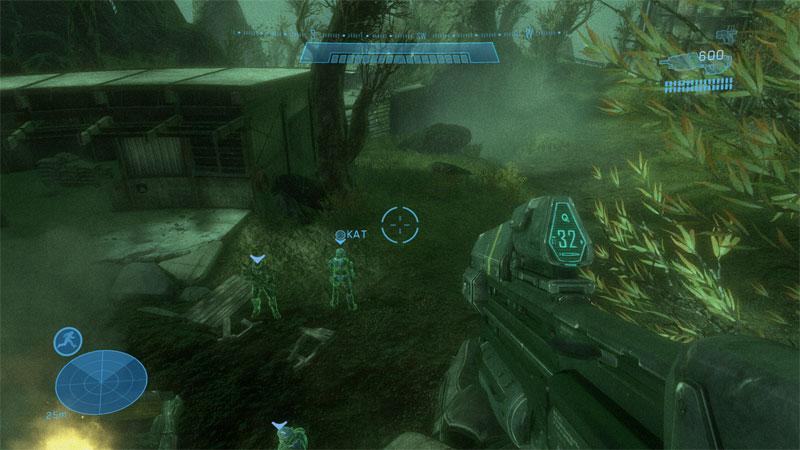
    In Halo: Reach, you can activate Night Vision, which turns the game world into a green, monochromatic image.
    This is not just a visual effect — it creates an experience surprisingly close to what Polar Bear Helps does.

    Halo: Reach in Night Vision mode — an example of how green monochromaticity changes the perception of the game and brings it closer to the Digital Bridge idea.

    When NV is active:

    • colors disappear,
    • the world becomes less stimulating,
    • the green tint calms the mind,
    • and the game becomes tiring more quickly.

    This is exactly the same principle used by Digital Bridge:
    green monochromaticity reduces stimulation and helps the player gently return to the real world.

    Halo: Reach turns out to be much closer to the Polar Bear Helps philosophy than one might expect.

    Games that allow Night Vision on demand

    Night Vision appears mainly in tactical and military games, where it serves a functional purpose rather than a decorative one.
    Here are the most notable titles where NV can be activated manually:

    Tactical and military shooters:

    • Tom Clancy’s Ghost Recon
    • Crysis
    • Metal Gear Solid V: The Phantom Pain
    • Ground Branch
    • S.T.A.L.K.E.R. GAMMA
    • Battlefield 3
    • Contractors (VR)

    Horror and survival:

    • Left 4 Dead
    • SCP: Containment Breach
    • Arrogation: Unlight of Day

    Other genres (rare):

    • Nightvision: Drive Forever

    Why Night Vision appears almost exclusively in shooters

    Night Vision is a tactical tool, not an aesthetic effect.

    • Shooters often take place in dark environments where NV makes sense.
    • NV provides tactical advantage — seeing in the dark, planning movement.
    • In other genres, NV adds nothing to gameplay.
    • It requires specific shaders and lighting setups that naturally fit military games.

    This is why NV is mostly found in shooters — there it serves a purpose, not just a visual flourish.

    A vision for the future: one Polar Bear Helps-inspired filter in game engines

    I would like to see future game engines include a single filter inspired by Polar Bear Helps:

    Green monochromaticity.

    One unified effect that combines:

    • reduced visual stimulation,
    • a calming green tint,
    • a gentle lowering of arousal,
    • a natural soft landing after long play sessions.

    Such a filter could activate automatically after extended gameplay — a subtle, healthy transition back to the real world.
    A practical implementation of the Digital Bridge concept.

  • Polar Bear Helps is joining Stripe Climate

    I’m happy to share that Polar Bear Helps is joining Stripe Climate.
    From now on, 1% of every contribution will support carbon‑removal technologies.
    It’s a small step, but every step matters — especially when we’re building technology that truly helps.

  • The Polar Bear Helps website is live

    We have completed the first iteration of the website.
    You can now explore how Polar Bear Helps works and discover what Technology that cares truly means.

    This is only the beginning — more sections, new content, and expanded features will be added soon.
    Polar Bear Helps grows together with the idea it was created to support.

    I hope that Polar Bear Helps will prove helpful for you as well.

  • A new direction in my work on digital well‑being

    As part of my ongoing work on how to support well‑being while using digital devices, I have published the Digital Bridge Manifesto. It introduces a new concept showing that technology can help us return to the physical world in a gentle, natural, and conflict‑free way.

    Digital Bridge proposes a smooth transition from digital activity to analog activity by preserving a shared theme, atmosphere, or sensory experience. Instead of a sudden cut‑off, it offers continuity — reducing stress and resistance while supporting creativity and emotional regulation.

    This approach has become a new element of Technology that cares — technology designed with care for the human being and for everyday functioning in a world that blends the digital with the real.